tubedrop — drop a link, get the file
A two-click macOS app that turns a YouTube link into a clean download. Local web UI over yt-dlp, privacy-first HD unlock, no sketchy converter sites. Open source, MIT.
- Python
- yt-dlp
- ffmpeg
- macOS
- Claude Code
- Open Source
tubedrop: a personal itch, scratched in an evening
I just wanted to save a video from YouTube. Every converter site was the same wall: popups, redirects, fake “Download” buttons, a hard 360p cap, and half the time you walk away with nothing.
So I built a tiny macOS app for myself. Paste a link, pick a quality, hit download. The file lands on your Mac. No site, no account, no ads.
View on GitHub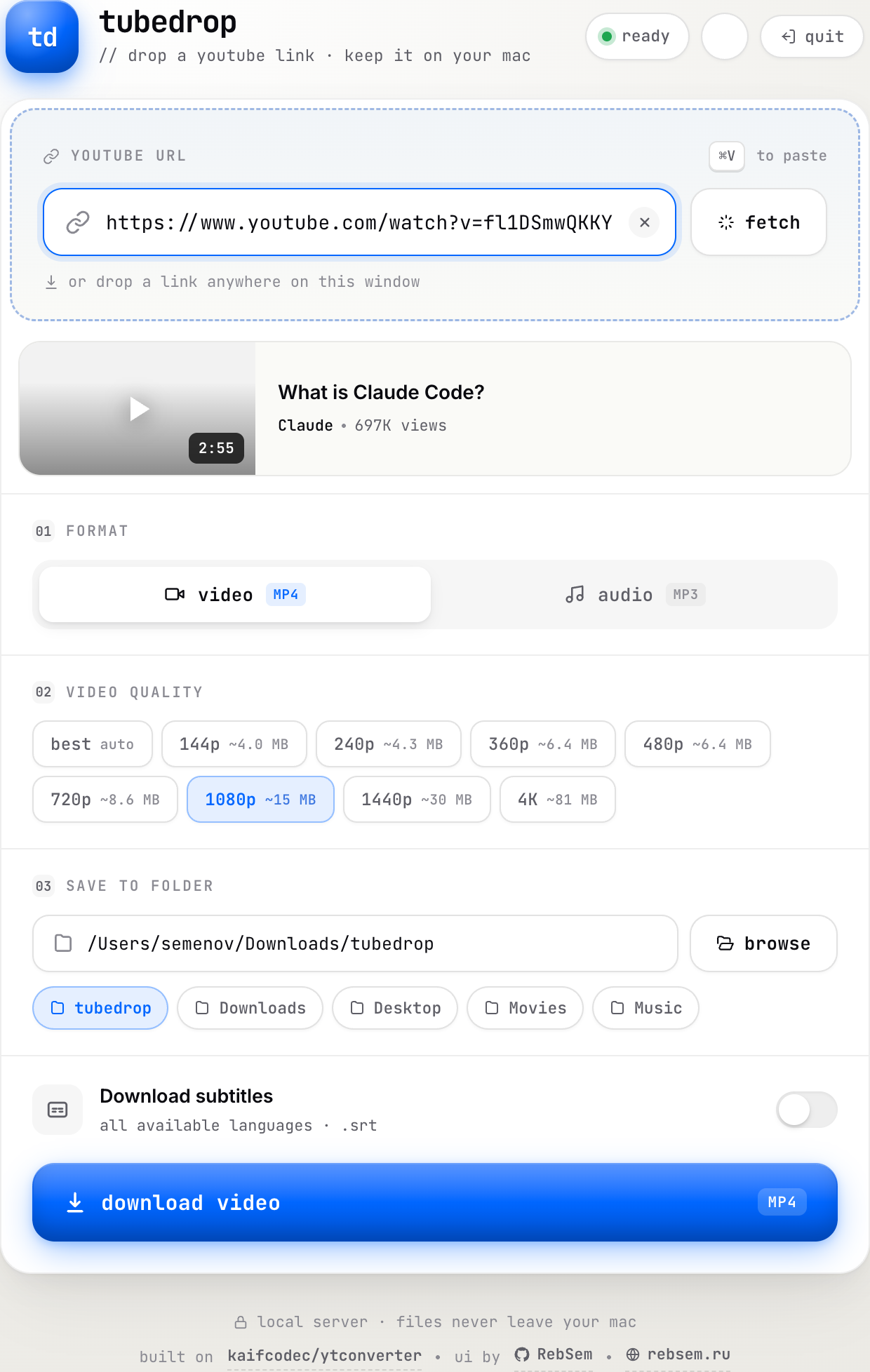
The problem
Downloading a YouTube video should be trivial. In practice, the open web makes it miserable on purpose:
- Converter sites are adware traps. Every “free YouTube downloader” is a maze of fake buttons and redirects designed to get a click on anything except the actual file.
- They cap quality. Anonymous web tools routinely top out at 360p, because YouTube serves better formats only to logged-in clients.
- The good tools are terminal-only.
yt-dlp+ffmpegis the gold standard and it’s free, but it’s a command line with flags. You can’t hand that to a friend who just wants a video.
kaifcodec/ytconverter had already done the hard part: it glues yt-dlp and ffmpeg together cleanly. But it’s still a CLI with prompts. tubedrop is the missing layer on top: a UI so it’s two clicks instead of ten keystrokes, and something I’m not embarrassed to send to a non-programmer.
What it does
The whole product is a single local window: no dashboard, no settings maze. Open it and the flow is obvious:
- Drop a link, get a preview. Paste a YouTube URL (or drag it anywhere onto the window) and tubedrop fetches the title, channel, duration, and thumbnail so you know you grabbed the right thing.
- Pick exactly the quality you want. A real format ladder, from
bestdown through 4K / 1440p / 1080p / 720p, with a live size estimate next to each, so you’re not guessing what a download will cost you in disk. - Video or audio. One toggle switches from an MP4 video to an MP3 rip, handy for podcasts and music.
- Choose where it saves. Quick-pick chips for
Downloads,Desktop,Movies,Music, or a dedicatedtubedropfolder, plus a native folder picker. - Subtitles in one tap. Optional
.srtin every available language.
It runs as a local server on your own machine. Files never leave your Mac, and there’s no third party in the middle.
Privacy-first HD unlock
The one genuinely tricky part of downloading from YouTube: sometimes it hides everything above 360p from anonymous tools. The honest fix is to read the YouTube cookies from a browser you’re already logged into, which lifts the cap to 720p / 1080p / 4K.
The catch is that “let an app read your browser cookies” is exactly the kind of sentence that should make you suspicious. So tubedrop is loud about what it does and doesn’t do:
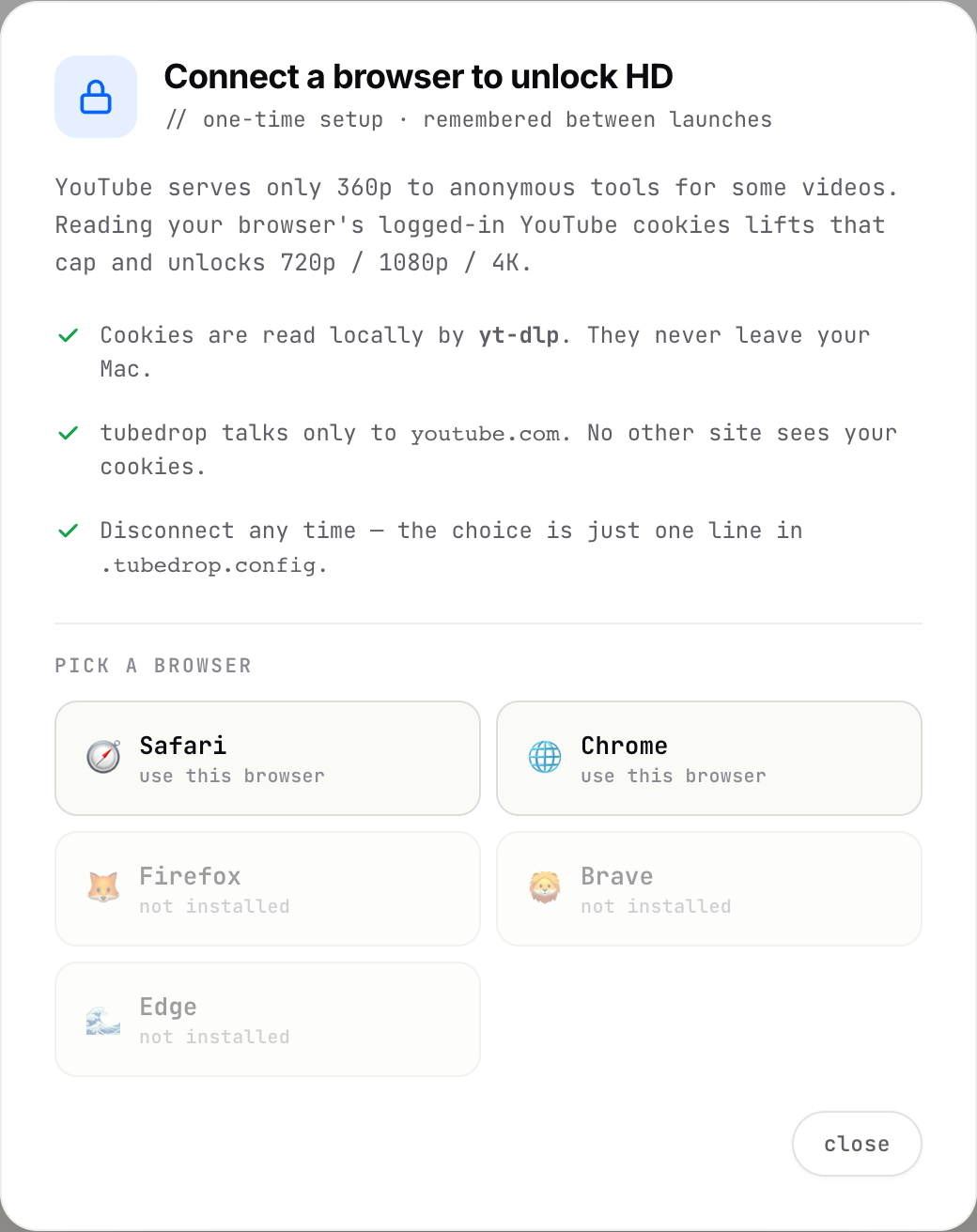
- Cookies are read locally by
yt-dlp. They never leave the Mac. - It talks only to
youtube.com. No other site ever sees your cookies. - It’s one-time and reversible. Your choice is a single line in
.tubedrop.config; thehd · safarichip in the header disconnects it whenever you want.
A pet project still earns trust or loses it on details like this. I’d rather over-explain the one scary-sounding feature than ship it quietly.
Install: genuinely two clicks
The other half of “shareable with a non-techie” is the install. No Homebrew, no sudo, no global Python surgery.
- Download the zip, unzip it anywhere.
- Double-click
install.command.
In about 30 seconds the installer:
- uses your system Python if it’s 3.10+, otherwise downloads a self-contained Python 3.12 (~30 MB) so version hell never happens;
- drops a static
ffmpegbinary into the project folder; - installs
yt-dlpinto a local virtual environment; - puts a
Tubedropshortcut on your Desktop.
Everything stays inside the folder. Uninstalling is rm -rf: delete the folder and it’s gone, no leftovers. A Quit button in the window’s corner shuts the local server down cleanly, so there are no zombie processes squatting on a port.
How I built it
This was vibe-coding with Claude Code: I described what I wanted, then iterated on the UI, the installer, and the cookie flow. The code isn’t an engineering showcase; it’s a usefulness showcase. The interesting work was product judgment: where to be opinionated (one window, obvious flow), where to be loud (the HD-unlock trade-off), and how to make the install boring enough that anyone can run it.
Two principles I held to:
- I credit the core.
yt-dlp,ffmpeg, and especially kaifcodec/ytconverter do the heavy lifting; the README says so plainly. I wrap good tools in better UX; I don’t relabel someone else’s work as mine. - I close my own pain points fast, in public. When I hit a solid CLI with no UX wrapper, I’ll wrap it so it’s not just me who can use it, then open-source the result.
It’s MIT-licensed and the full source is on GitHub. Take it, fork it, send a PR.
For personal use. Respect the YouTube Terms of Service.